Introduction
Lesson planning consumes a significant chunk of every teacher's week. According to OECD's TALIS research, teachers spend a substantial portion of their working hours on preparation and planning tasks outside classroom instruction — time that competes with marking, parent communication, and professional development.
AI promises to change that equation. But many teachers who've tried it run into the same wall: vague outputs, generic lesson structures that fit no classroom in particular, and the nagging uncertainty of whether the content is even accurate.
This guide is a practical walkthrough of how to use AI for lesson planning in a way that actually works. It covers what to prepare before you start, how to prompt effectively, what to review before anything reaches students, and how to build a feedback loop that improves your teaching over time.
Key Takeaways
- AI lesson planning works best with five specific inputs ready: objective, subject, grade level, time, and curriculum standard
- Treat AI as a co-author — review every output before use, especially in science, history, and maths
- A complete AI-generated lesson plan needs: learning objective, warm-up, instructional sequence, differentiation options, formative assessment, and closure
- Build prompts in layers: start with the basics, then refine with follow-ups targeting specific student needs
- Feeding student performance data back into AI is what turns time-saving into genuine teaching improvement
When Should You Use AI for Lesson Planning?
AI earns its place in lesson planning when the task is genuinely time-consuming or complex. Applied carelessly, it generates output that looks complete but still needs significant rework — defeating the purpose.
Where AI Earns Its Place
These are high-effort tasks where AI consistently reduces planning time:
- Building a unit from scratch on an unfamiliar topic
- Aligning existing lessons to new or updated curriculum standards (CBSE, ICSE, state board, NEP 2020)
- Creating differentiated versions of a lesson for students at different levels
- Designing formative assessments aligned to specific learning objectives
- Generating warm-up activities, discussion prompts, or extension tasks quickly
The teachers who see the strongest returns tend to share a few traits: they're new to a grade level or subject, managing large mixed-ability classes, or working under tight academic calendars.
Where AI Gets Misused
- Copy-pasting without review: AI output is a draft. Treating it as a finished lesson leads to gaps in accuracy and relevance.
- Skipping fact-checks on content-heavy lessons: science, history, and maths topics especially need verification before classroom use.
- Regenerating lessons that don't need it: if a lesson is effective and needs minor updates, a quick manual edit is faster and safer than a full AI rebuild.
What You Need Before You Start
The single biggest reason AI lesson plan outputs disappoint teachers is under-specified input. Garbage in, generic out.
The Five Core Inputs
Before opening any AI tool, have these ready:
| Input | Why It Matters |
|---|---|
| Learning objective | Defines what the lesson is for — without it, AI fills the space with generic activity |
| Subject and grade level | Determines vocabulary complexity, scaffolding depth, and age-appropriateness |
| Lesson duration | Shapes pacing and activity selection entirely |
| Curriculum standard | Ensures output aligns to CBSE, ICSE, state board, or NEP 2020 requirements |
| Classroom context | Class size, known learning gaps, diverse learner needs — this is what makes a plan yours |
General-Purpose Tools vs. Education-Specific Platforms
General-purpose AI tools like ChatGPT can generate lesson plans — but the teacher must supply every piece of context manually in every session. The tool knows nothing about your students, your curriculum, or what was taught last week.
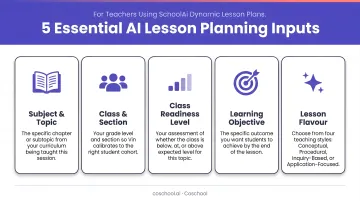
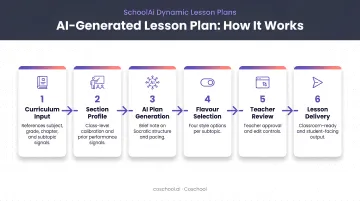
Education-specific platforms work differently. Coschool's SchoolAI, for example, pre-populates curriculum context automatically so teachers aren't building prompts from scratch each time. Its Dynamic Lesson Plan Generator draws on four live input signals:
- Chapter timing
- Section-level prerequisite gaps
- Recent homework performance
- Section Learning Index data
Plans are section-specific, meaning Class 9C gets a differently calibrated plan than Class 9B based on each section's actual gap profile.
The mindset prerequisite applies to both: AI is a capable assistant that needs clear direction, not an authority whose output skips review.
How to Use AI for Lesson Planning: A Step-by-Step Process
Setting Up Your Inputs
The difference between useful and useless AI output comes down to prompt quality.
Weak prompt:
"Make a lesson plan for Grade 5 science."
Strong prompt:
"Create a 45-minute lesson plan for Grade 5 science on states of matter, aligned to NCERT Chapter 4. Learning objective: students will be able to identify examples of solids, liquids, and gases from everyday life and explain particle behaviour in each state. Class of 32 students; 4–5 students have difficulty with English reading comprehension."
The strong prompt gives the AI enough to work with. The weak one gives it nothing but a topic and a grade — which is why the output feels generic.
Generating the Lesson Plan
A complete AI-generated lesson plan should include all of these components. If any are missing from the initial output, ask for them explicitly:
- Clear learning objective — stated in student-facing language
- Warm-up / activating activity — connects prior knowledge to new content
- Core instructional sequence — the main teaching steps with rough time allocations
- Differentiation option — at least one adaptation for struggling or advanced learners
- Formative assessment — how you'll know students understood before the lesson ends
- Closure activity — consolidates learning and previews what comes next
Use follow-up prompts in the same conversation to adjust what the initial output gives you:
- "Make the warm-up a pair activity rather than individual."
- "Shorten the core activity to fit a 30-minute period."
- "Add a visual organiser for the instructional sequence."
Starting broad and refining with follow-up prompts consistently produces more usable output than packing every requirement into a single opening prompt.
Reviewing the Output
Review every AI-generated plan before using it. Check for:
- Factual accuracy — especially in science, history, and maths, where AI can produce plausible-sounding errors
- Age-appropriateness — does the language and activity complexity match your grade level?
- Objective alignment — does every activity actually connect to the stated learning goal?
- Cultural and contextual relevance — AI training data can reflect biases that don't fit an Indian classroom context
A useful prompt to add before you finish: "Flag any content in this lesson that I should independently verify." AI tools will surface uncertain areas if asked directly.
Teacher expertise is irreplaceable here. No AI knows whether a particular activity will fall flat with your specific group of students, or whether a concept was already covered last term and needs a different entry point.
Customising for Your Students
Once you have a base lesson plan, use follow-up prompts to generate differentiated versions:
- "Adapt this lesson for a student reading two grade levels below."
- "Create an extension activity for students who finish the core task early."
- "Rewrite the instructions using simpler vocabulary for students who need additional support."
AI can generate the options — but deciding which fits each student is still your call. Differentiation works best when you've already pinpointed the specific need.
Refining Plans Over Time
The most underused application of AI in lesson planning is feeding student performance back into it. After a lesson, try prompting:
"Students struggled with the concept of fractions yesterday. Here's what we covered: [brief summary]. Adjust this follow-up plan to address that gap."
This feedback loop — lesson → student response → adjusted next plan — is what separates one-time AI use from genuinely improved teaching practice.
Coschool's SchoolAI is built around this loop. Observed learning gaps from homework feed directly into the next lesson plan as one of four input signals, so teachers don't need to manually translate performance data into new prompts — the calibration is built into the workflow.
Best Practices for Effective AI Lesson Planning
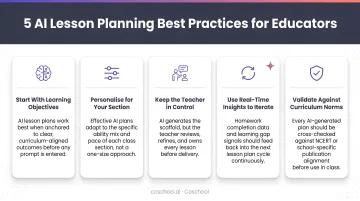
Prompt in layers, not one long block. Start with your five core inputs as a foundation. Add classroom context and special requirements as follow-up prompts. This produces more usable output than front-loading everything at once.
Apply the 80/20 rule. Let AI handle the structural draft — objectives, activity sequence, timing. Your professional expertise shapes the final 20%: the examples that will land with your specific class, the cultural references that make content stick, and the pacing calls only you can make.
Generate the assessment in the same session. While context is fresh, prompt AI to create a formative check aligned to the lesson's learning objective. Assessment and instruction designed separately tend to drift apart.
Always verify subject-specific content. Add this prompt before ending any lesson planning session: "Flag any content in this lesson that I should independently verify." This applies above all to science facts, historical dates, and mathematical procedures.
Iterate across sessions, not just within them. Save prompts that produced strong outputs. Over time, your prompt library becomes a planning asset — one that gets sharper as you refine it for your subject, grade level, and student group.
Conclusion
Effective AI-assisted lesson planning is less about finding the right tool and more about the discipline of showing up with clear inputs, reviewing what comes out carefully, and integrating AI into an existing professional practice rather than handing it over.
Start small: pick one upcoming unit, use AI to generate a draft, and put it through the review process described here. Teachers who approach this incrementally — building prompting instincts one lesson at a time — get more consistent results than those who try to overhaul their entire planning workflow at once.
The real shift happens when AI handles the structural scaffolding — sequencing, question sets, differentiation options — and you spend your preparation time on what only you can provide: knowing your students, reading the room, and adjusting in the moment. That's where good teaching actually lives.
Frequently Asked Questions
Can ChatGPT create lesson plans?
Yes — ChatGPT and similar general-purpose tools can generate solid lesson plan drafts when given specific, well-structured prompts. They require the teacher to supply all curriculum and classroom context manually, and every output needs review for accuracy, age-appropriateness, and alignment before classroom use.
What are the 5 C's of lesson plans?
The 5 C's framework covers Content, Context, Connections, Competencies, and Closure. AI can help structure each component — but needs clear inputs on curriculum standards and learning objectives to make the output meaningful and specific to your class.
How do I write a good prompt for AI lesson planning?
A good prompt includes subject, grade level, lesson duration, the relevant curriculum standard (such as NCERT chapter or CBSE outcome code), and the specific learning objective. Follow-up prompts within the same conversation — "make the warm-up collaborative," "shorten for 30 minutes" — refine the output further.
Is AI lesson planning suitable for all grade levels and subjects?
AI can support lesson planning across most K-12 grade levels and subjects. Apply extra scrutiny to content-heavy subjects like science, history, and mathematics, where factual errors are more common and harder to spot without subject knowledge.
How do I make sure AI lesson plans align with curriculum standards?
Include the exact standard code or learning outcome in your prompt, then cross-check the AI output against the official curriculum document. Education-specific platforms like Coschool's SchoolAI build curriculum alignment directly into the lesson generation workflow, so the output starts closer to what the standard requires.
What are the limitations of using AI for lesson planning?
AI cannot know individual students, may produce inaccurate content, and can reflect biases from its training data. Teacher review is non-negotiable — AI drafts the plan, but the judgment teachers bring from knowing their class is something no tool can replicate.